How to Read Coinpath Graph
Different Components of the Money Flow Graph
Taking the Money Flow as a DAG Multigraph (directed acyclic multi graph)
- Nodes: Nodes in a graph represent entities, and in the context of Money Flow, these entities are addresses. Addresses can be sending or receiving tokens.
- Level: The level of a node in a DAG Multigraph represents the causal order of the transactions, or how many hops away it is from the current address A. A higher level indicates that the transaction occurred later in time, and therefore requires more hops to reach.
- Edges: Edges in a DAG Multigraph represent relationships between nodes. In the context of Money Flow, edges represent money transfers between addresses.
- Multigraph: A multigraph is a graph that can have multiple edges between the same pair of nodes. This is necessary for Money Flow because an address can send money to another address in multiple sequential transactions.
- Edge labels: Edges in a DAG Multigraph can be labeled with additional information. In the context of Money Flow, edges are labeled with the amount of money transferred, the timestamp of the transaction, and other relevant information.
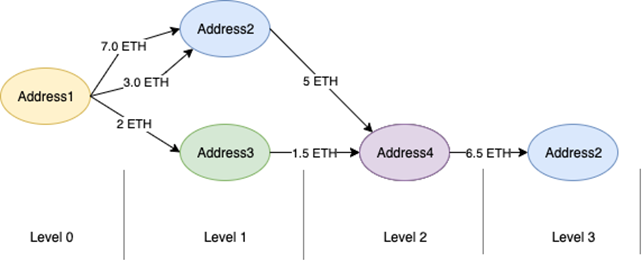
Take a look at this image below
-
Address 1 on the diagram is the originating address,
-
It has 2 outbound transfers to Addresses 2 and one transfer to address 3.
-
Address 4 receives money from Address 2 and Address 3, and sends to Address 2.
-
Note, that Address 2 is present in money flow graph twice, on level 1 and level 3.
Reading a Coinpath Graph Example
Let's take this graph for a wallet address
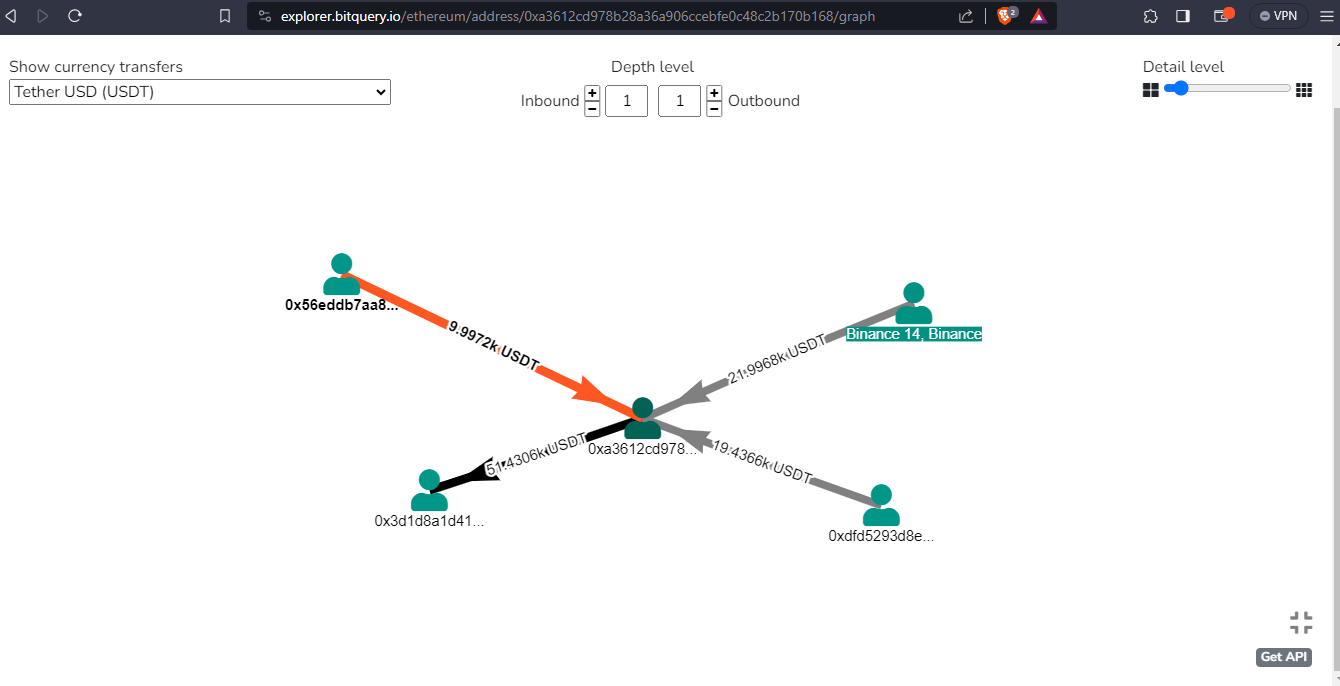
- For simplicity, we have set both inbound and outbound levels to 1, which means we are tracking only the immediate transfers of USDT
- The address has 3 inbound transfers of values 9.99972k USDT, 21.9968k USDT and 19.4366k USDT
- There is only 1 outbound transfer of 51.4306k USDT
Understanding Transaction and Transactions in Coinpath
The transaction and transactions are two different dimensions used to group results differently. We will look at one example for each case and see how it differs.
Take the below example:
query ($network: EthereumNetwork!, $address: String!, $inboundDepth: Int!,$limit: Int!, $currency: String!, $from: ISO8601DateTime, $till: ISO8601DateTime) {
ethereum(network: $network) {
  inbound: coinpath(
    initialAddress: {is: $address}
    currency: {is: $currency}
    depth: {lteq: $inboundDepth}
    options: {direction: inbound, asc: "depth", desc: "amount", limitBy: {each: "depth", limit: $limit}}
    date: {since: $from, till: $till}
  ) {
    transaction {
      hash
      time {
        time
      }
      value
    }

    sender {
      address
      annotation
      smartContract {
        contractType
        currency {
          symbol
          name
        }
      }
    }
    receiver {
      address
      annotation
      smartContract {
        contractType
        currency {
          symbol
          name
        }
      }
    }
    amount
    currency {
      symbol
    }
    depth
    count
  }
}
}

{
"inboundDepth": 1,
"outboundDepth": 1,
"limit": 10,
"offset": 0,
"network": "ethereum",
"address": "0xbd3afb0bb76683ecb4225f9dbc91f998713c3b01",
"currency": "ETH",
"from": "2023-09-20",
"till": "2023-09-27T23:59:59",
"dateFormat": "%Y-%m-%d"
}
Here the transaction{} field will return the full transaction object for each transaction, including the sender, receiver details. So the results are grouped by individual transactions.
Now, take this query,
query ($network: EthereumNetwork!, $address: String!, $inboundDepth: Int!,$limit: Int!, $currency: String!, $from: ISO8601DateTime, $till: ISO8601DateTime) {
  ethereum(network: $network) {
    inbound: coinpath(
      initialAddress: {is: $address}
      currency: {is: $currency}
      depth: {lteq: $inboundDepth}
      options: {direction: inbound, asc: "depth", desc: "amount", limitBy: {each: "depth", limit: $limit}}
      date: {since: $from, till: $till}
    ) {
      transactions {
        amount
        height
        timestamp
        txHash
        txValue
      }

      sender {
        address
        annotation
        smartContract {
          contractType
          currency {
            symbol
            name
          }
        }
      }
      receiver {
        address
        annotation
        smartContract {
          contractType
          currency {
            symbol
            name
          }
        }
      }
      amount
      currency {
        symbol
      }
      depth
      count
    }
  }
}
{
  "inboundDepth": 1,
  "outboundDepth": 1,
  "limit": 10,
  "offset": 0,
  "network": "ethereum",
  "address": "0xbd3afb0bb76683ecb4225f9dbc91f998713c3b01",
  "currency": "ETH",
  "from": "2023-09-20",
  "till": "2023-09-27T23:59:59",
  "dateFormat": "%Y-%m-%d"
}
Here, the results uses the sender.address and receiver.address fields to group the results. This means that the query will return a list of all transactions sent by and received by each address.
The choice of which dimension to use will depend on your specific needs. If you need detailed information about each transaction, then you should use the transaction dimension. If you need to identify the most active senders and receivers, or track the flow of funds between different addresses, then you should use the transactions dimension.
Understanding finalAddress and sender, receiver in Coinpath
By using the finalAddress with initialAddress filters, you can trace a path or graph. On the other hand, using the sender and receiver filters allows you to focus on direct transfers.
For example, the provided query demonstrates how to retrieve all outbound paths, including loops, from 0xa910f92acdaf488fa6ef02174fb86208ad7722ba to 0x5265754ebfcfa800051df99ebaf6b4b41a5e0bb1 in the Ethereum network.
By modifying these filters and parameters, you can explore different transaction paths and analyze specific sender-receiver relationships.
query ($network: EthereumNetwork!, $outboundDepth: Int!, $limit: Int!, $currency: String!) {
  ethereum(network: $network) {
    outbound: coinpath(
      initialAddress: {is: "0xa910f92acdaf488fa6ef02174fb86208ad7722ba"}
      finalAddress: {is: "0x5265754ebfcfa800051df99ebaf6b4b41a5e0bb1"}
      currency: {is: $currency}
      depth: {lteq: $outboundDepth}
      options: {direction: outbound, asc: "depth", desc: "amount", limitBy: {each: "depth", limit: $limit}}
    ) {
      sender {
        address
        annotation
        smartContract {
          contractType
          currency {
            symbol
            name
          }
        }
      }
      receiver {
        address
        annotation
        smartContract {
          contractType
          currency {
            symbol
            name
          }
        }
      }
      amount(in: USD)
      currency {
        symbol
        name
      }
      depth
      count
    }
  }
}

{
  "inboundDepth": 3,
  "outboundDepth": 3,
  "limit": 100,
  "offset": 0,
  "network": "ethereum",
  "currency": "ETH",
  "dateFormat": "%Y-%m"
}
The below query on the other hand, gets direct transfers from 0xa910f92acdaf488fa6ef02174fb86208ad7722ba to 0x5265754ebfcfa800051df99ebaf6b4b41a5e0bb1 irrespective of what depth you mention.
query ($network: EthereumNetwork!, $outboundDepth: Int!, $limit: Int!, $currency: String!) {
  ethereum(network: $network) {
    inbound: coinpath(
      sender: {is: "0xa910f92acdaf488fa6ef02174fb86208ad7722ba"}
      receiver: {is: "0x5265754ebfcfa800051df99ebaf6b4b41a5e0bb1"}
      currency: {is: $currency}
      depth: {lteq: $outboundDepth}
      options: {direction: outbound, asc: "depth", desc: "amount", limitBy: {each: "depth", limit: $limit}}
    ) {
      sender {
        address
        annotation
        smartContract {
          contractType
          currency {
            symbol
            name
          }
        }
      }
      receiver {
        address
        annotation
        smartContract {
          contractType
          currency {
            symbol
            name
          }
        }
      }
      amount(in: USD)
      currency {
        symbol
        name
      }
      depth
      count
    }
  }
}

{
  "inboundDepth": 3,
  "outboundDepth": 3,
  "limit": 10,
  "offset": 0,
  "network": "ethereum",
  "currency": "ETH",
  "dateFormat": "%Y-%m"
}