Pump.fun Token Sniffer
This guide demonstrates how to build a basic Pump.fun token analysis tool using Bitquery APIs. The tool displays various on-chain metrics related to Pump.fun tokens on Solana, helping users understand token distribution, holder behavior, and transfer patterns.
⚠️ Important: Proof of Concept
This tool is a proof of concept that displays various metrics and data points about Pump.fun tokens. It does not make definitive claims about whether a token is a scam or legitimate. The metrics shown are for informational purposes only. You should conduct your own research and due diligence before making any investment decisions. This tool demonstrates how to use Bitquery APIs to build token analysis tools - you can extend this foundation to create more advanced analysis systems.
GitHub Repository: pumpfun-token-sniffer
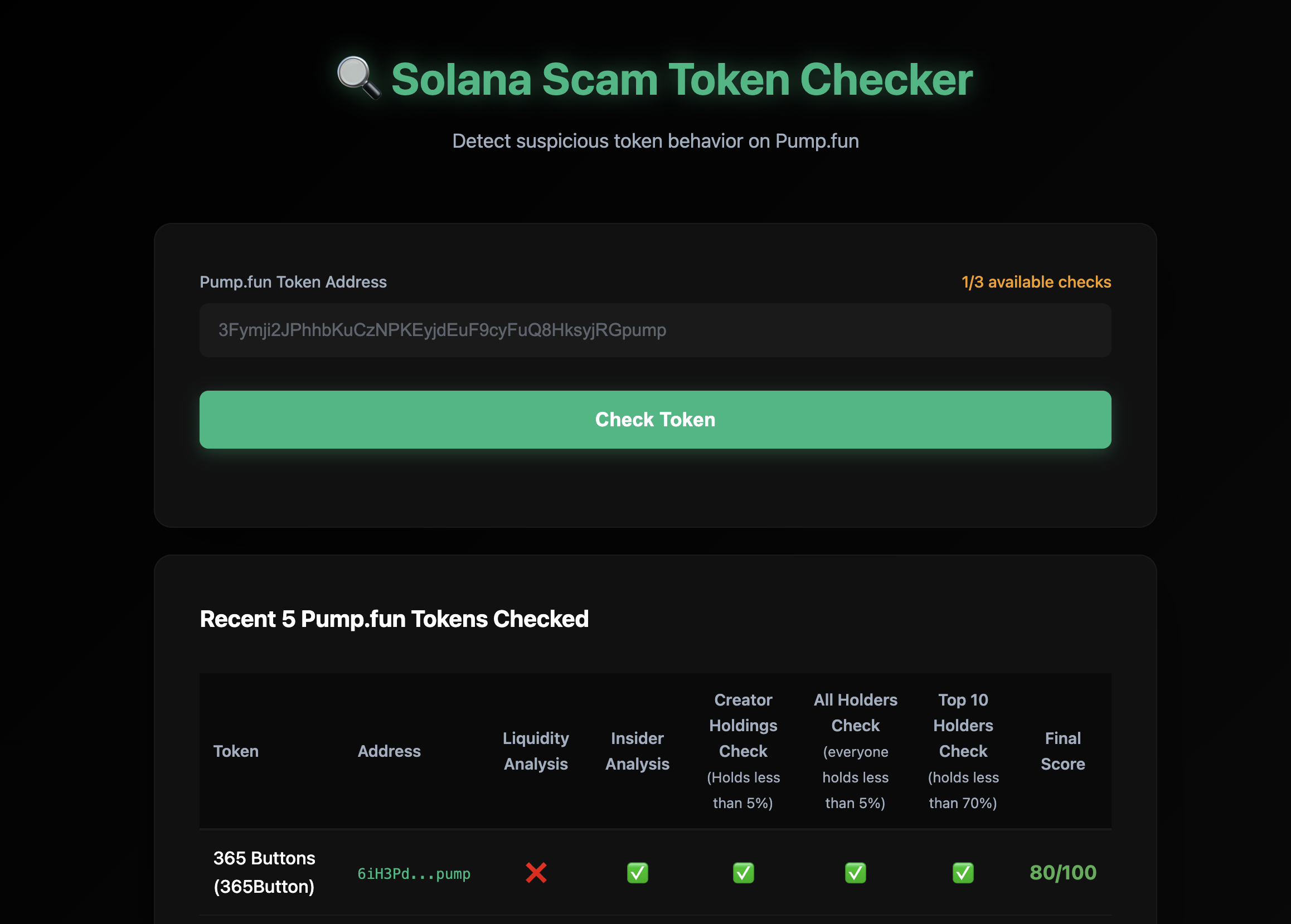
Overview
The Pump.fun Token Sniffer is a Python-based analysis tool built with Bitquery APIs that displays various metrics about Pump.fun tokens. The tool provides:
Token Information Metrics
- Bonding Curve Address: Automatically detects and displays the bonding curve address
- Token Creation Details: Creator address, creation timestamp, and transaction signature
- Token Metadata: Name, symbol, IPFS metadata (image, website, social links, description)
- Token Status: Mayhem mode status and graduation status (whether token has migrated to PumpSwap)
Holder Distribution Metrics
- Top 10 Holders: List of addresses with the largest token holdings
- Holding Percentages: Percentage of total supply held by each top holder
- Creator Holdings: Percentage of tokens held by the creator (if in top 10)
- Top 10 Concentration: Total percentage of supply held by top 10 holders
- Holder Distribution Checks: Flags if any single holder (excluding bonding curve) holds more than 5% of supply
Holder Activity Metrics
- Pump Token Portfolio: Number of different Pump.fun tokens each holder owns
- Trading Activity: Number of trades executed by each holder in the last 6 hours
- Holder Engagement: Activity level indicators based on recent trading
Transfer and Purchase Analysis Metrics
- Transfer Statistics: Total addresses that received token transfers
- Purchase Statistics: Number of addresses that purchased the token
- Transfer vs Purchase Comparison: Analysis of addresses that received transfers vs those that made purchases
- Transfer Timing Analysis: Comparison of first transfer timestamps vs first purchase timestamps
- Transfer Amounts: Total amounts transferred, purchased, and transferred without corresponding purchases
Liquidity Metrics
- Pool Liquidity: Current SOL liquidity in the bonding curve pool
Interface Options
- Web UI: Modern web interface for interactive analysis
- Command Line: Terminal-based interface for quick checks
Prerequisites
- Python 3.8+ installed on your system
- Bitquery API Token - Get your API token here
- Basic understanding of Solana blockchain and Pump.fun tokens
Installation
- Clone the repository:
git clone https://github.com/Akshat-cs/pumpfun-token-sniffer
cd pumpfun-token-sniffer
- Install the required dependencies:
pip install -r requirements.txt
-
Set up your API key:
- Copy
.env.sampleto.env:
cp .env.sample .env- Edit
.envand replaceyour_api_key_herewith your actual Bitquery API key:
BITQUERY_API_KEY=BQ_your_actual_api_key_here - Copy
Project Structure
The project consists of two main files:
check_phishy_token.py: Core analysis logic with GraphQL queries and detection algorithmsapp.py: Flask web application that provides the UI and API endpoints
How It Works
The tool uses multiple GraphQL queries from Bitquery APIs to fetch and display various token metrics:
- Bonding Curve Detection: Finds the bonding curve address by querying Pump.fun creation instructions
- Token Creation Data: Retrieves creator address, creation time, and transaction details
- Token Metadata: Fetches token name, symbol, and IPFS metadata
- First Transfers Query: Fetches the first transfers of a token to various addresses
- First Buys Query: Retrieves purchase data for addresses that received transfers
- Top Holders Query: Gets top 10 holders with their current holdings
- Holder Activity Analytics: Fetches pump token portfolio counts and recent trade activity for each holder
- Holder Distribution Analysis: Calculates concentration metrics and distribution patterns
- Liquidity Query: Gets current pool liquidity information
- Graduation Check: Verifies if token has migrated to PumpSwap
Transfer vs Purchase Analysis
One of the metrics the tool displays is a comparison between token transfers and purchases:
- Addresses with transfers but no purchases: Shows addresses that received tokens via transfer but never purchased them
- Transfer timing vs purchase timing: Compares when addresses first received transfers vs when they first made purchases
- Transfer amounts: Displays total amounts transferred, purchased, and the difference
Note: This metric is displayed for informational purposes. While unusual patterns (like many addresses receiving transfers without purchases) can be noteworthy, they do not definitively indicate whether a token is legitimate or not. Many factors contribute to token distribution patterns, and this tool simply presents the data for your analysis.
Code Walkthrough
1. Bonding Curve Detection
The tool first identifies the bonding curve address by querying Pump.fun creation instructions:
def get_bonding_curve_address(token_address: str, api_key: str) -> Optional[Dict]:
    """
    Get the bonding curve address for a Pump.fun token by querying the create instruction.
    The bonding curve is the 3rd account in the Instruction accounts array.
    """
    query = """
    query MyQuery($token: String) {
      Solana {
        Instructions(
          where: {
            Instruction: {
              Program: {
                Address: {is: "6EF8rrecthR5Dkzon8Nwu78hRvfCKubJ14M5uBEwF6P"}
                Method: {in: ["create", "create_v2"]}
              }
              Accounts: {includes: {Address: {is: $token}}}
            }
            Transaction: {Result: {Success: true}}
          }
        ) {
          Block {
            Creation_time: Time
          }
          Instruction {
            Accounts {
              Address
            }
            Program {
              AccountNames
              Method
              Arguments {
                Name
                Type
                Value {
                  ... on Solana_ABI_String_Value_Arg {
                    string
                  }
                  ... on Solana_ABI_Boolean_Value_Arg {
                    bool
                  }
                }
              }
            }
          }
          Transaction {
            Creation_transaction: Signature
            DevAddress: Signer
          }
        }
      }
    }
    """
The bonding curve is extracted from the 3rd account (index 2) in the accounts array. This query also extracts token metadata (name, symbol, URI), creator address, creation time, and Mayhem mode status.
2. First Transfers Query
This query fetches the first transfers of the token to addresses (excluding the bonding curve):
def get_first_transfers_pumpfun(token_address: str, bonding_curve: str, api_key: str) -> List[Dict]:
    """
    Query 1: Get the first transfers of a Pump.fun token to addresses (Solana).
    """
    query = """
    query MyQuery($token: String, $bonding_curve: String) {
      Solana {
        Transfers(
          limit: { count: 1000 }
          orderBy: { ascendingByField: "Block_first_transfer" }
          where: {
            Transfer: {
              Receiver: {
                Token: {
                  Owner: {
                    not: $bonding_curve
                    notIn: ["8psNvWTrdNTiVRNzAgsou9kETXNJm2SXZyaKuJraVRtf", "AkTgH1uW6J6j6QHmFNGzZuZwwXaHQsPCpHUriED28tRj"]
                  }
                }
              }
              Currency: { MintAddress: { is: $token } }
            }
            Transaction: { Result: { Success: true } }
          }
        ) {
          Transfer {
            Receiver {
              Token {
                Owner
              }
            }
          }
          Block {
            first_transfer: Time(minimum: Block_Time)
          }
          total_transferred_amount: sum(of: Transfer_Amount)
        }
      }
    }
    """
This query:
- Limits results to 1,000 addresses
- Excludes the bonding curve and known system addresses
- Groups by receiver address
- Gets the first transfer timestamp and total transferred amount
3. First Buys Query
This query checks if the addresses that received transfers ever bought the token:
def get_first_buys_pumpfun(token_address: str, buyers_list: List[str], api_key: str) -> Dict[str, Dict]:
    """
    Query 2: Get first buys of an address list for a specific Pump.fun token (Solana).
    """
    query = """
    query MyQuery($token: String!, $buyersList: [String!]) {
      Solana {
        DEXTradeByTokens(
          orderBy: { ascendingByField: "Block_first_buy" }
          where: {
            Trade: {
              Account: { Token: { Owner: { in: $buyersList } } }
              Currency: { MintAddress: { is: $token } }
              Side: { Type: { is: buy } }
            }
            Transaction: { Result: { Success: true } }
          }
        ) {
          Trade {
            Account {
              Token {
                Owner
              }
            }
            Currency {
              Name
              Symbol
              MintAddress
            }
            Side {
              Type
            }
          }
          Block {
            first_buy: Time(minimum: Block_Time)
          }
          total_bought_amount: sum(of: Trade_Amount)
        }
      }
    }
    """
This query:
- Filters for buy-side trades only
- Groups by buyer address
- Gets the first buy timestamp and total bought amount
4. Transfer vs Purchase Analysis
The analysis function compares transfers and purchases to identify patterns:
def analyze_phishy_behavior_pumpfun(transfers: List[Dict], buy_data: Dict[str, Dict]) -> Tuple[int, List[Dict]]:
    """
    Analyze transfers vs purchases to identify patterns for Pump.fun tokens.
    """
    addresses_with_patterns = []

    for transfer in transfers:
        receiver = transfer["Transfer"]["Receiver"]["Token"]["Owner"]
        first_transfer_time = transfer["Block"].get("first_transfer")
        total_transferred = transfer.get("total_transferred_amount", 0)

        buy_info = buy_data.get(receiver)
        total_bought = buy_info.get("total_amount", 0) if buy_info else 0
        transferred_without_buy = float(total_transferred) - float(total_bought)

        if buy_info is None:
            # Address received transfer but never purchased
            addresses_with_patterns.append({
                "address": receiver,
                "first_transfer_time": first_transfer_time,
                "first_buy_time": None,
                "total_transferred": total_transferred,
                "total_bought": 0,
                "transferred_without_buy": transferred_without_buy,
                "pattern": "Never bought the token"
            })
        else:
            first_buy_time = buy_info.get("first_buy_time")
            # Compare timestamps - if transfer happened before buy, note the pattern
            if first_transfer_time < first_buy_time:
                addresses_with_patterns.append({
                    "address": receiver,
                    "first_transfer_time": first_transfer_time,
                    "first_buy_time": first_buy_time,
                    "total_transferred": total_transferred,
                    "total_bought": total_bought,
                    "transferred_without_buy": transferred_without_buy,
                    "pattern": "Transfer before buy"
                })

    return len(addresses_with_patterns), addresses_with_patterns
5. Top Holders Analysis
The tool also fetches top 10 holders with additional analytics:
def get_top_holders_pumpfun(token_address: str, api_key: str) -> List[Dict]:
    """
    Get top 10 holders of a Pump.fun token.
    """
    query = """
    query MyQuery($token: String) {
      Solana {
        BalanceUpdates(
          limit: {count: 10}
          orderBy: {descendingByField: "BalanceUpdate_Holding_maximum"}
          where: {
            BalanceUpdate: {
              Currency: {MintAddress: {is: $token}}
            }
            Transaction: {Result: {Success: true}}
          }
        ) {
          BalanceUpdate {
            Currency {
              Name
              MintAddress
              Symbol
            }
            Account {
              Token {
                Owner
              }
            }
            Holding: PostBalance(maximum: Block_Slot, selectWhere: {ne: "0"})
          }
        }
      }
    }
    """
For each holder, the tool also fetches:
- Pump token count: Number of Pump.fun tokens held by the address
- Trade activity: Number of trades in the last 6 hours
6. Web Application (Flask)
The Flask app (app.py) provides a REST API endpoint:
@app.route(f'{APPLICATION_ROOT}/api/check', methods=['POST'])
def check_token():
    """API endpoint to analyze a token and return various metrics."""
    data = request.get_json()
    token_address = data.get('token_address', '').strip()

    # Find bonding curve
    bonding_curve_data = get_bonding_curve_address(token_address, API_KEY)

    # Get transfers and analyze patterns
    transfers = get_first_transfers_pumpfun(token_address, bonding_curve, API_KEY)
    addresses = [t["Transfer"]["Receiver"]["Token"]["Owner"] for t in transfers]
    buy_data = get_first_buys_pumpfun(token_address, addresses, API_KEY)
    pattern_count, addresses_with_patterns = analyze_phishy_behavior_pumpfun(transfers, buy_data)

    # Get top holders with stats
    top_holders = get_top_holders_pumpfun(token_address, API_KEY)
    # ... enrich with pump token counts and trade activity

    return jsonify(result)
Additional Features
- Bonding Curve Detection: Automatically finds the bonding curve address associated with the token
- Top Holders Analysis: Shows the top 10 holders with:
- Number of pump tokens each holds
- Recent trading activity (last 6 hours)
- Percentage of total supply
- Holder Distribution Analysis: Displays concentration metrics showing if creator or other holders hold more than 5% of supply
- Token Metadata: Fetches token name, symbol, and IPFS metadata (image, website, social links)
- Liquidity Information: Gets current pool liquidity
- Graduation Check: Verifies if token has graduated to PumpSwap (not supported)
- Summary Statistics: Provides aggregated totals of transferred amounts, bought amounts, and amounts transferred without purchase
Running the Tool
Option 1: Web UI (Recommended)
- Start the web server:
python app.py
-
Open your browser and navigate to
http://localhost:8080 -
Enter a Pump.fun token address in the input field
-
Click "Check Token" to run the analysis
The web UI features:
- Modern web3-styled interface with dark theme
- Automatic bonding curve detection
- Top 10 holders table with pump token counts and trade stats
- Clickable addresses linking to DEXrabbit
- Copy-to-clipboard functionality for addresses
- Detailed breakdown of transfer vs purchase analysis
- All token metrics displayed in organized sections
- Summary statistics for all metrics
- Responsive design
Option 2: Command Line
Run the analysis directly from the command line:
python check_phishy_token.py WZrxegwJK4vWFGC149Ajt86vbKA9tsrJxu8mJFdpump
Note: The bonding curve is automatically detected, so you only need to provide the token address.
Understanding the Output
The tool displays various metrics organized into different sections:
Token Information
- Bonding Curve Address: The bonding curve program address for this token
- Creator Address: The wallet address that created the token
- Creation Time: When the token was created
- Transaction Signature: The transaction that created the token
- Token Name & Symbol: Basic token information
- Token Metadata: IPFS metadata including image, website, social links, and description
- Mayhem Mode: Whether the token was created in Mayhem mode (affects total supply)
- Graduation Status: Whether the token has migrated to PumpSwap
Top Holders Metrics
For each of the top 10 holders, the tool displays:
- Address: The wallet address
- Holding Amount: Number of tokens held
- Percentage of Supply: What percentage of total supply this holder owns
- Pump Token Count: How many different Pump.fun tokens this address holds
- Trades (Last 6h): Number of trades executed in the last 6 hours
Holder Distribution Analysis
- Creator Percentage: If creator is in top 10, shows their holding percentage
- Creator Check: Indicates if creator holds less than 5% (or not in top 10)
- Other Holders Check: Indicates if any other holder (excluding creator) holds more than 5%
- Top 10 Total Percentage: Combined percentage of supply held by top 10 holders
- Top 10 Check: Indicates if top 10 hold less than 70% of supply
Transfer vs Purchase Analysis Metrics
This section displays data comparing token transfers and purchases:
- Total Addresses with Transfers: Count of all addresses that received the token via transfer
- Addresses with Transfers but No Purchases: Number of addresses that received transfers but never purchased
- Addresses with Both Transfers and Purchases: Number of addresses that both received transfers and made purchases
For addresses that received transfers but didn't purchase (or received transfers before purchases), the tool shows:
- Address: The wallet address
- First Transfer Time: When the address first received the token
- First Buy Time: When the address first purchased (if any)
- Total Transferred: Total amount of tokens transferred to this address
- Total Bought: Total amount of tokens purchased by this address
- Amount Transferred Without Buy: Difference between transferred and bought amounts
- Pattern Type: Description of the pattern observed (e.g., "Never bought the token" or "Transfer before buy")
Summary Totals:
- Total Amount Transferred to All Addresses
- Total Amount Bought by All Addresses
- Total Amount Transferred Without Purchase
Liquidity Metrics
- Current Pool Liquidity: Amount of SOL currently in the bonding curve pool
Example Output
The command-line output displays metrics in a structured format:
============================================================
Checking Pump.fun token: WZrxegwJK4vWFGC149Ajt86vbKA9tsrJxu8mJFdpump
============================================================

Finding bonding curve address...
Found bonding curve: ABC123...

Found 150 addresses that received transfers
Found buy records for 45 addresses

============================================================
RESULTS
============================================================

Total addresses that received transfers: 150
Addresses with transfers but no purchases: 105
Addresses with both transfers and purchases: 45

Transfer vs Purchase Analysis:
Found 105 address(es) with transfers but no purchases:

1. Address: ABC123...
   First Transfer: 2024-01-15 10:30:00 UTC
   First Buy: N/A
   Total Transferred: 1,000,000.00
   Total Bought: 0
   Amount Transferred Without Buy: 1,000,000.00
   Pattern: Never bought the token

------------------------------------------------------------
TRANSFER VS PURCHASE SUMMARY:
------------------------------------------------------------
Total Amount Transferred: 5,000,000.00
Total Amount Bought: 500,000.00
Total Amount Transferred Without Purchase: 4,500,000.00
------------------------------------------------------------
The web UI displays all metrics in an organized dashboard format with sections for token information, top holders, holder distribution analysis, transfer vs purchase metrics, and liquidity data.
API Endpoints
The Flask web application provides the following endpoints:
POST /api/check
Analyzes a Pump.fun token for phishy behavior.
Request Body:
{
  "token_address": "WZrxegwJK4vWFGC149Ajt86vbKA9tsrJxu8mJFdpump"
}
Response:
{
  "success": true,
  "token_address": "WZrxegwJK4vWFGC149Ajt86vbKA9tsrJxu8mJFdpump",
  "token_type": "pumpfun",
  "data": {
    "total_addresses": 150,
    "transfer_purchase_analysis": {
      "addresses_with_transfers_no_purchases": 105,
      "addresses_with_both": 45
    },
    "transfer_purchase_details": [
      {
        "address": "ABC123...",
        "first_transfer_time": "2024-01-15T10:30:00Z",
        "first_buy_time": null,
        "total_transferred": "1000000.0",
        "total_bought": "0",
        "transferred_without_buy": 1000000.0,
        "pattern": "Never bought the token"
      }
    ],
    "top_holders": [
      {
        "address": "XYZ789...",
        "holding": "50000000",
        "percent_holding": 5.0,
        "pump_tokens_count": 12,
        "trades_6h": 5
      }
    ],
    "bonding_curve": "BondingCurveAddress...",
    "token_creation": {
      "transaction_signature": "Signature...",
      "creator_address": "CreatorAddress...",
      "creation_time": "2024-01-15T09:00:00Z"
    },
    "token_metadata": {
      "name": "Token Name",
      "symbol": "SYMBOL",
      "is_mayhem_mode": false,
      "image": "https://ipfs.io/ipfs/...",
      "website": "https://example.com",
      "twitter": "@example"
    },
    "holder_analysis": {
      "creator_percent": 2.5,
      "creator_check_passed": true,
      "other_holders_check_passed": true,
      "top10_percent": 45.0,
      "top10_check_passed": true
    },
    "liquidity_sol": 125.5,
    "totals": {
      "total_transferred": 5000000.0,
      "total_bought": 500000.0,
      "total_without_buy": 4500000.0
    }
  }
}
GET /api/recent-phishy
Returns a list of recently analyzed tokens from the cache (only tokens with transfer vs purchase patterns are cached).
Response:
{
  "success": true,
  "tokens": [
    {
      "token_address": "WZrxegwJK4vWFGC149Ajt86vbKA9tsrJxu8mJFdpump",
      "token_type": "pumpfun",
      "transfer_purchase_count": 105,
      "timestamp": "2024-01-15T12:00:00Z",
      "totals": {
        "total_transferred": 5000000.0,
        "total_bought": 500000.0,
        "total_without_buy": 4500000.0
      }
    }
  ],
  "count": 1
}
Limitations
- Supported Tokens: Only Pump.fun tokens on Solana are supported
- Token Age: The tool works best with tokens created recently (bonding curve detection may fail for very old tokens)
- Graduated Tokens: Tokens that have graduated to PumpSwap are not supported (tool will return an error)
- Address Limit: Analyzes up to 1,000 addresses per token (limit in the GraphQL query)
- Query Time: Queries may take 10-60+ seconds depending on data size (normal for blockchain queries)
- API Rate Limits: Subject to Bitquery API rate limits and quota restrictions
Use Cases
This proof-of-concept tool demonstrates how to use Bitquery APIs to build token analysis tools. It can be used for:
- Token Research: View various on-chain metrics about Pump.fun tokens in one place
- Holder Analysis: Understand token distribution and concentration patterns
- Activity Monitoring: See trading activity and engagement levels of top holders
- Data Aggregation: Collect multiple data points from different Bitquery APIs
- Learning Tool: Understand how to query and analyze Solana blockchain data using Bitquery
- Foundation for Advanced Tools: Use this as a starting point to build more sophisticated analysis systems
Building Advanced Tools
This is a basic proof-of-concept tool that demonstrates the capabilities of Bitquery APIs. You can extend this foundation to build more advanced analysis systems by:
- Adding more sophisticated analysis algorithms
- Implementing machine learning models for pattern detection
- Creating real-time monitoring and alerting systems
- Building comprehensive risk scoring systems
- Integrating with other data sources
- Adding historical trend analysis
- Creating comparative analysis across multiple tokens
- Building portfolio tracking and management tools
The Bitquery APIs provide access to comprehensive blockchain data that can power much more advanced analysis tools than this basic example.
Important Considerations
- This tool displays metrics only: It does not make definitive claims about token legitimacy or risk
- Metrics are informational: All data points shown are for your analysis and research purposes
- Not investment advice: This tool is not financial or investment advice
- Conduct your own research: Always perform thorough due diligence before making any decisions
- Proof of concept: This is a basic demonstration - you can build more advanced tools using the same Bitquery APIs
- Token age limitations: The tool works best with recently created tokens (bonding curve detection may fail for very old tokens)
Support
For questions or issues:
- Check the GitHub repository for updates and issues
- Contact Bitquery support via Telegram or create a ticket here