Array Intersection
The array_intersect feature is an advanced query format that generates an intersection of addresses from specified datasets. You can use the where clause to introduce filters that refine your results according to desired criteria. The output is a list of addresses that share a common link to the two datasets.
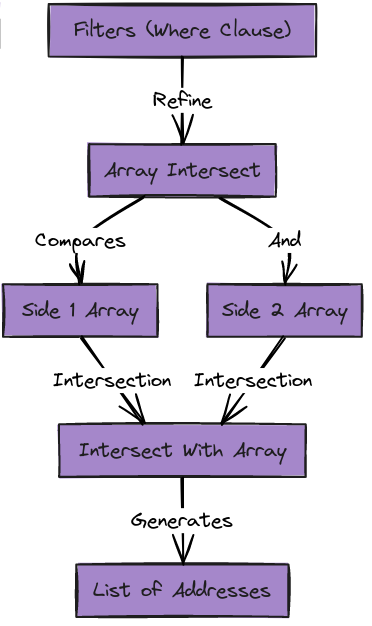
In the following section, we'll explore how to use array_intersect to reveal the associations between pairs of addresses or contracts.
Syntax
array_intersect(side1: side1, side2: side2, intersectWith: array)
where
side1: The first array that you want to compare.side2: The second array that you want to compare.intersectWith: The array containing elements to be used for intersection with the first two arrays.
Constraints:
- Applicable only to fields with a string data type.
- Any string-typed field works, not only addresses — DEX market names and protocol families
intersect just as well, and
intersectWithlikewise accepts non-address strings. - Other response fields are supported in the output. Metrics (
count,uniq,sum,median) and dimensions (for examplePair { Market { Name } }orBlock { Date }) can be selected alongside the intersection and come back populated — which is what makes per-group intersections useful.
where must admit every member of intersectWithThe intersection is computed over rows the where clause already admits. If the filter excludes
any member of intersectWith, that member contributes nothing and the result silently shrinks
rather than erroring. Make sure the where clause spans every element you are intersecting on.
Example
Suppose you have an array of two addresses ( A and B ) and want to identify which addresses have engaged in transactions with both Contract A and Contract B. By passing these arrays to array_intersect, the function will return an array of addresses that interacted with both contracts.
query($addresses: [String!]) {
  EVM(dataset: archive){
    Transfers(
      where: {
        any: [
          {
        	  Transfer: {Sender: {in: $addresses} Receiver: {notIn: $addresses}}

          },
          {
            Transfer: {Receiver: {in: $addresses} Sender: {notIn: $addresses}}
          },
        ]
      }

    ) {

      array_intersect(
        side1: Transfer_Sender
        side2: Transfer_Receiver
        intersectWith: $addresses
      )

    }
  }
}
<!-- Parameters -->
{
  "addresses": ["0x21743a2efb926033f8c6e0c3554b13a0c669f63f","0x107f308d85d5481f5b729cfb1710532500e40217"]
}
This query will return a response in this format ; as an array consisting of elements found in both side1 and side2 that have interacted with all the addresses in the intersectWith array. If no common elements are detected, the result will be an empty array.
{
  "EVM": {
    "Transfers": [
      {
        "array_intersect": [
          "0xba5a64df95acba7c0f43e830f5622cbd389cfc4d",
          "0x74374f95e4630df9b7f70b2d45e64da6437885c7",
          "0x3f1f6f2537d095b6f5650b371c11dcc8bc90b0f3"]
      }
    ]
  }
}
Ready to run this in production?
Get an API key and run these queries in minutes, or talk to us about plans and enterprise delivery.