GraphQL Joins
Starting March 2025, Bitquery APIs support joins on the v2 endpoint.
The joinPLACEHOLDER function enables you to embed a subquery within your main query, allowing data retrieval from the same or a different cube. This is functionally equivalent to an SQL JOIN statement, providing more efficient and structured data fetching.
For example,
query MyQuery {
  EVM {
    DEXTradeByTokens{
        # fields from main cube
      joinCalls{
            # Additional fields from the joined cube
      }
    }

  }
}
JOIN Type
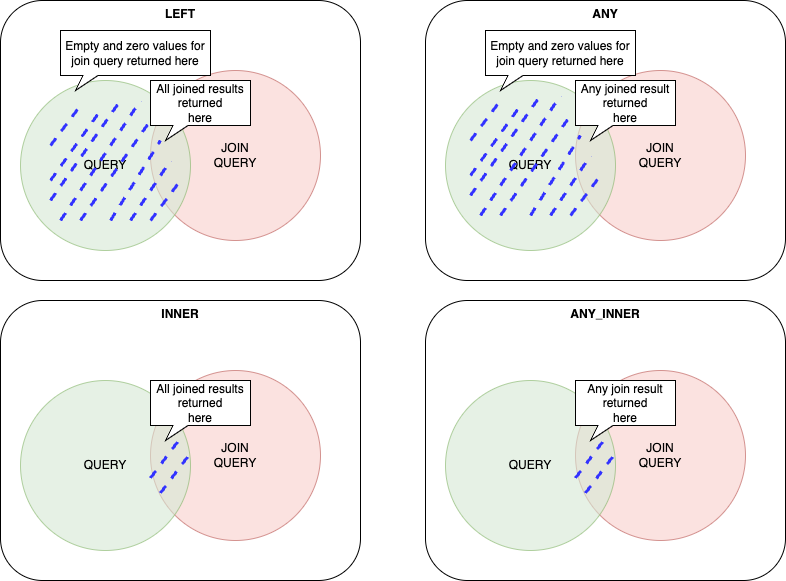
4 types of joins are supported:
left( default ) that returns all results from the query matched with all results from joined query. In case join query has no matching result, empty values are returnedanyis the same as left, except that maximum one ( any ) result is returned from the joined query;innerreturns only matching results. If there are no matching results in joined query, the result is not returned;inner_anyreturns only one ( any ) matching result. If there are no matching results in joined query, the result is not returned;
Here are the additional details from your document that you may want to include in your Markdown:
1. Schemas Supported
- Joins are available for EVM, Tron, and Solana schemas in GraphQL v2.
2. Join Query Structure
- The
joinPLACEHOLDERfunction embeds a subquery into the main query, wherePLACEHOLDERis the name of the cube being joined. - The joined query preserves the full schema of the joined cube, allowing:
- Querying all fields & metrics
- Using additional filters
- Setting limits & aggregations
3. Matching Conditions
-
At least one attribute must be selected for matching between the main query and joined query.
-
Example:
query {EVM {Transfers {joinCalls(join: left, Call_To: Transfer_Receiver) {count}}}} -
The above example joins
Calls.Call_TowithTransfers.Transfer_Receiver. -
Multiple Matching Conditions
query {EVM {Transfers {joinCalls(join: leftCall_To: Transfer_ReceiverTransaction_Hash: Transaction_Hash) {count}}}}- Ensures both
Call_TomatchesTransfer_ReceiverandTransaction_Hashmatches.
- Ensures both
4. Other Attributes of Join Query
-
where: Additional filtering -
limit / limitBy: Restricting result sets -
orderBy: Sorting the joined results -
Example:
Transfers {joinCalls(join: left Call_To: Transfer_Receiverwhere: {Call: {Signature: {Name: {in: ["Transfer","TransferFrom"]}}}}){count}}
5. Performance Optimization
- Use joins only when necessary, as they are computationally expensive.
- Avoid unnecessary joins when the same data can be retrieved via direct queries.
- Use pre-aggregated results to reduce data load.
- Use join types
anyorinner_anyto limit excess data retrieval.
6. Limitations
- Joins only work in queries (subscriptions not supported).
- Cannot join different datasets (say real-time and archive).
- Joins can only be applied at the first query level.
- Cannot filter query results using join query fields.
7. Why a join returns empty fields
This is the most common problem with joins, and it does not look like an error. The query succeeds, the row comes back, and every field from the joined cube is blank:
{
  "trades": "1",
  "volumeUsd": "0",
  "joinTokenSupplyUpdates": {
    "TokenSupplyUpdate": { "PostBalance": "", "PostBalanceInUSD": "0", "Currency": { "Symbol": "" } }
  }
}
Nothing is wrong with the syntax. left is the default join type, and a left join with no
match returns the main row with empty values for the joined side. It is indistinguishable from
a real result that happens to be zero.
Diagnose it by switching to inner. An inner join drops rows that do not match, so the
row count tells you the truth immediately:
- Rows come back → the join matches, and your original empty values were genuine data.
- Zero rows → nothing matched, and the left join was lying to you.
The usual cause is that the joined cube has no rows in the same window. A join cannot span datasets, so both sides must exist in the dataset you queried. Cubes that only write on specific events are the common trap:
TokenSupplyUpdatesonly writes on mint and burn. An established token may go a long time without one, so joining it to recent trades to compute market cap matches nothing. The same join works well for a freshly launched token, which mints constantly.- Low-activity cubes generally will not have a row in a short retained window.
Sanity-check a join against a pair you know matches before trusting it in production, and
prefer inner or inner_any while developing so a mismatch is visible.
A join that reliably matches, because the joined side is dense — checking whether a transfer recipient is a smart contract:
query IsReceiverAContract {
  EVM(network: eth) {
    Transfers(
      limit: { count: 10 }
      where: {
        Transfer: {
          Currency: { SmartContract: { is: "0xdac17f958d2ee523a2206206994597c13d831ec7" } }
        }
      }
    ) {
      Transfer {
        Receiver
        Amount
      }
      joinCalls(Call_To: Transfer_Receiver, join: inner, limit: { count: 1 }) {
        count
      }
    }
  }
}
With join: inner, only transfers whose receiver has been called as a contract come back. Any
receiver that survives is a contract, and any that disappears is an externally owned account.
Swapping to the default left would return every transfer with an empty joinCalls, which
tells you nothing.
8. Example Use Cases
Example 1 : Check if an address is a smartcontract
Take this query for example, it helps you detect if an address is a smart contract.
{
  EVM(dataset: archive, network: eth) {
    Transfers(
      where: {Transfer: {Sender: {is: "0xcf38be613203b39a14d2fb3c1a345122ec0a4351"}}, Block: {Date: {after: "2025-03-01"}}}
    ) {
      Transfer {
        Receiver
      }
      count
      joinCalls(Call_To: Transfer_Receiver, join: inner) {
        count
      }
    }
  }
}
How This Works
- The query finds all transfers from a specific sender
- Then, it checks if the receivers of these transfers were later called as smart contracts.
- Since only smart contracts can process function calls, it is likely a smart contract if an address appears in joinCalls.(since EOAs cannot process function calls)
- The count in joinCalls shows how many times the receiver was called.
Example 2: Get trades, volume and marketcap of a token
This query is a good example of how joins could be used to get mulltiple trade related matrixes with a single query.
query MyQuery($time_1hr: DateTime) {
  Solana {
    DEXTradeByTokens(
      where: {Trade: {Currency: {MintAddress: {is: "83vzRC3B9EQVjz8NDULhn7ywcX16TD8FsVFUAEE7pump"}}}, Block: {Time: {since: $time_1hr}}}
      limitBy: {by: Trade_Side_Currency_MintAddress, count: 1}
    ) {
      volume: sum(of: Trade_Side_AmountInUSD)
      trades: count
      joinBalanceUpdates(
        BalanceUpdate_Currency_MintAddress: Trade_Currency_MintAddress
        orderBy: {descending: Block_Time}
      ) {
        BalanceUpdate {
          PostBalanceInUSD
          PostBalance
          Currency {
            Name
            MintAddress
            Symbol
          }
        }
      }
    }
  }
}
How this works
- The query finds all the trades for the particular token after a given timestamp.
- Then the query perform aggregates functions like
sumandcountto getvolumeandtradesof a token after a given time. - Then it checks for the latest
BalanceUpdatesfor the token.
joinBalanceUpdates does not give you supply or market capBalanceUpdates records a balance change for one account, so the joined PostBalance is
whatever account happened to update most recently, not the token's total supply.
PostBalanceInUSD is that account's holding value, not market cap.
Checked against BONK: this join returns a PostBalance of a few million tokens worth tens of
dollars, while the token's actual supply is ~88 trillion at a market cap in the hundreds of
millions. The two are unrelated numbers.
The join happens to approximate supply only for a token whose balance updates are dominated by a single supply-holding account, such as a launchpad bonding curve early in its life. Do not rely on it in general.
For supply and market cap, query TokenSupplyUpdates directly rather than joining it. A
joinTokenSupplyUpdates on this query returns empty fields, because the join finds no match in
the same window (see why a join returns empty fields):
query TokenSupplyAndMarketCap {
  Solana {
    TokenSupplyUpdates(
      where: {
        TokenSupplyUpdate: {
          Currency: { MintAddress: { is: "DezXAZ8z7PnrnRJjz3wXBoRgixCa6xjnB7YaB1pPB263" } }
        }
      }
      orderBy: { descending: Block_Time }
      limit: { count: 1 }
    ) {
      TokenSupplyUpdate {
        PostBalance
        PostBalanceInUSD
        Currency { Symbol Name }
      }
    }
  }
}
Here PostBalance is the circulating supply and PostBalanceInUSD is the market cap.
Example 3: Get latest price and liquidity of a token in token pair
This query is a good example of how joins could be used to get latest price and liquidity of a token in particular token pair.
query PoolLiquidityAndPrice {
  EVM(dataset: combined, network: eth) {
    Balances(
      where: {
        Balance: { Address: { is: "0x1bCd6B0E97B51D76FD1752111a1fe2b473F655eE" } }
        Currency: { SmartContract: { is: "0x6b175474e89094c44da98b954eedeac495271d0f" } }
      }
      limit: { count: 1 }
    ) {
      Balance {
        Amount
      }
      Currency {
        Symbol
      }
      joinDEXTradeByTokens(
        Trade_Currency_SmartContract: Currency_SmartContract
        limit: { count: 1 }
      ) {
        Trade {
          PriceInUSD
        }
      }
    }
  }
}
How this works
Balancesreturns the pool address's current holding of the token directly. There is no summing step, becauseBalancesis backed by an aggregate-state table rather than a log of changes.- The join then pulls a
DEXTradeByTokensrow for the same token to attach a USD price.
Balances is daily-grained: it exposes Block.Date but not Block.Time, so
orderBy: { descending: Block_Time } on the joined DEXTradeByTokens is rejected. With no
time ordering available, the joined row is an arbitrary match — successive runs of this
query return different values, including PriceInUSD: 0.
The join is shown here because it demonstrates matching on Currency_SmartContract across
cubes. For an actual price, query DEXTradeByTokens directly with an explicit
orderBy: { descending: Block_Time } and combine the two results client-side.
Ready to run this in production?
Get an API key and run these queries in minutes, or talk to us about plans and enterprise delivery.