Upgrade to Bitquery Paid Plan
You are now in full control of your plan. You can upgrade yourself from your account — no sales call required — or contact sales for custom/Enterprise volumes.
👉 Upgrade now · See full plans
Self-service upgrade
Go to Account → Billing → Select Plan. The checkout is a 4-step flow: Choose plan → Plan configuration → Review & pay → Done.
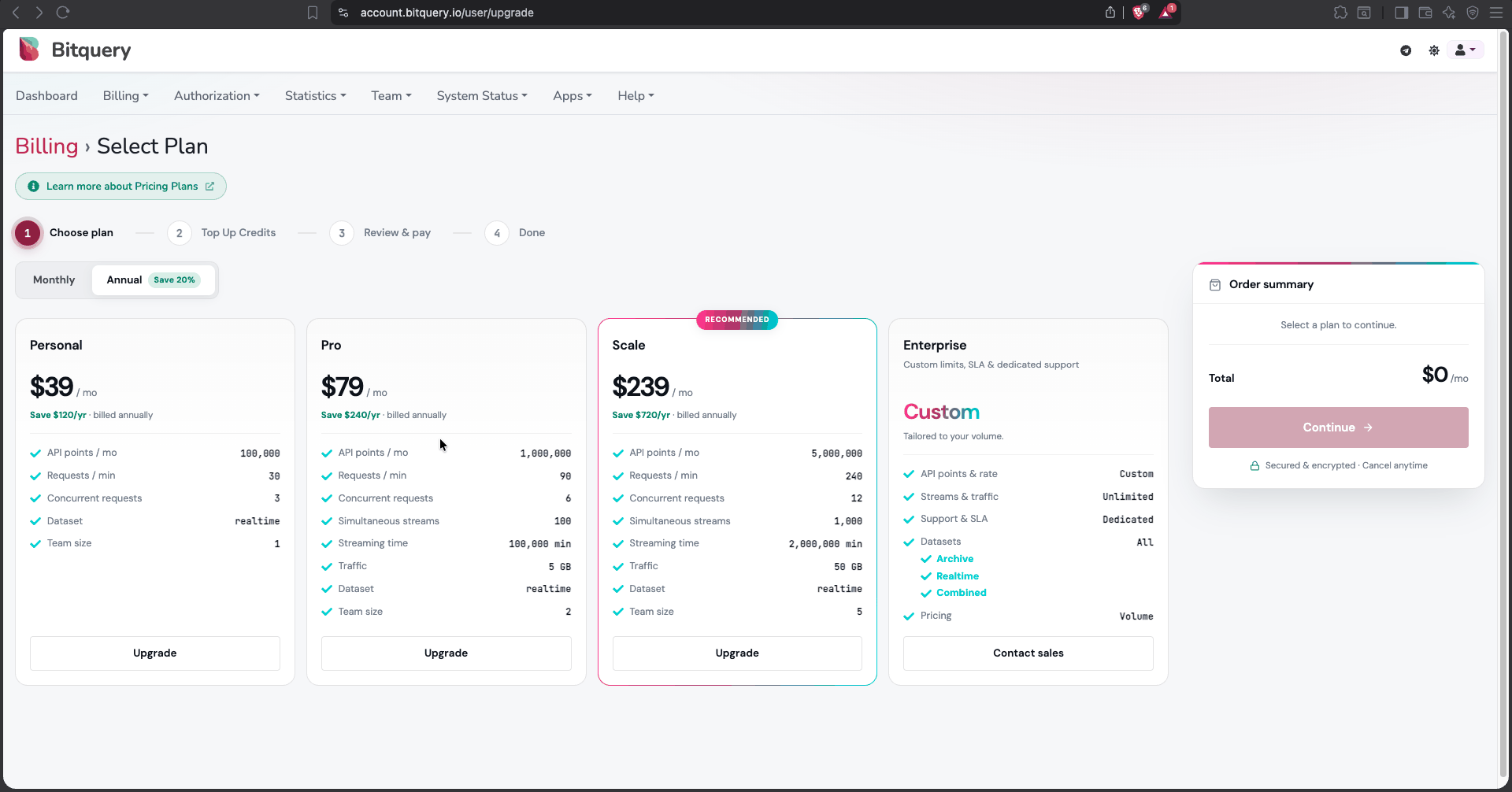
On the Choose plan step you can:
- ⚡ Pick a plan and upgrade instantly
- 🔢 Switch between Monthly and Annual billing (annual saves 30% or more)
- 💳 Pay by card, cancel anytime
Plans available on self-serve
| Plan | Monthly | Annual (per mo) | API points / mo | Requests / min | Concurrent requests | Simultaneous streams | Streaming time | Traffic | Team size |
|---|---|---|---|---|---|---|---|---|---|
| Personal | $49 | $29 | 100,000 | 30 | 3 | — | — | — | 1 |
| Pro | $99 | $69 | 1,000,000 | 90 | 6 | 100 | 100,000 min | 5 GB | 2 |
| Scale ⭐ (recommended) | $299 | $199 | 5,000,000 | 240 | 12 | 1,000 | 2,000,000 min | 50 GB | 5 |
| Enterprise | Custom | Custom | Custom | Custom | Custom | Unlimited | Custom | Unlimited | Custom |
Streaming is off on Personal — it starts at Pro. Annual billing saves 30% or more and locks the price for 12 months.
Self-serve plans query the realtime dataset by default. To query history — the archive and combined datasets — add the historical data add-on to your plan; see the pricing page for the chains it covers. Without it, a query using dataset: archive or dataset: combined will be rejected. Enterprise includes all datasets (Archive, Realtime, Combined), volume pricing, and dedicated support & SLA — contact sales for a quote.
For which cube has how much history on each chain, see Data Coverage & Retention.
Current pricing is always on the pricing page.
Top up credits (add-ons)
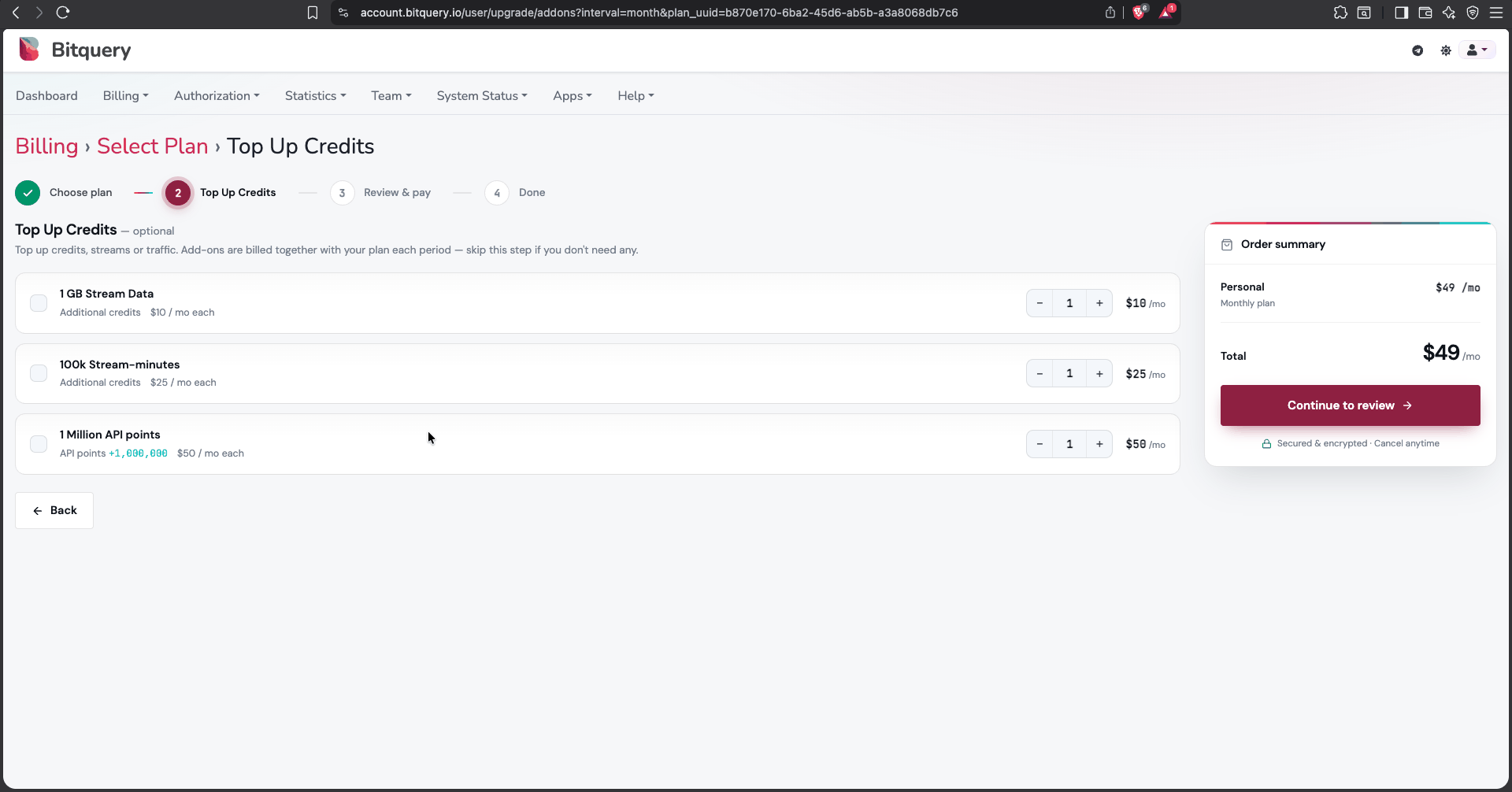
Step 2 of the checkout is Plan configuration — optional. Add-ons are billed together with your plan each period; skip the step if you don't need any.
| Add-on | What you get | Monthly | Annual (per mo) |
|---|---|---|---|
| API points | +1,000,000 API points | $50 | $35 |
| Stream-minutes | +200,000 streaming minutes | $50 | $35 |
| Stream data | +5 GB of stream traffic | $50 | $35 |
| MCP credits | Credits for MCP / AI agent requests | from $13/mo | — |
Top-ups are recurring — they refill each billing period. A one-time, non-recurring top-up of 1M points is also available at $100. Volume packs lower the unit rate as you scale: the largest pack cuts it by 70% for stream-minutes and 80% for stream data.
Historical data add-ons
Self-serve plans query the realtime dataset. To run dataset: archive or
dataset: combined, add the historical add-on for the chain you need:
| Chain | Add-ons | Indicative price (billed yearly) |
|---|---|---|
| Ethereum, BNB Chain (BSC), Base, Arbitrum, Optimism, Polygon, Tron, Robinhood, Arc | Historical Trading Data · Historical Transfers + Balances + Holders | from $70/mo per chain, per pack |
| Solana | Historical OHLCV & Token Price (DEXTradeByTokens and DEXTrades) · Historical Token Transfers & Balances (Transfers and Transactions) | $210/mo · $350/mo |
| Bitcoin, Bitcoin Cash, Litecoin, Dogecoin, Dash, Zcash | Chain Data (historical included) | $175/mo per chain |
| Cardano, Ripple, Stellar, Filecoin | Chain Data (historical included) | $175/mo per chain |
| Avalanche, Algorand, Celo, Cronos, Klaytn | Chain Data (historical included) | $105/mo per chain |
| Polymarket | Historical Data (from 1 September 2025) | $105/mo |
| All chains | Address Label Data (multi-chain) | $69/mo |
Bundles cover the eight EVM chains in one purchase, and all six UTXO chains in another — cheaper than buying the chains individually. Tron and Solana are sold per chain. Use the ⓘ on any add-on in checkout to see exactly which datasets, cubes and time scope it unlocks. Prices above are indicative and vary by monthly vs yearly billing — checkout and the pricing page are the source of truth.
Cardano, Ripple, Stellar, Algorand, Filecoin, Avalanche, Celo, Cronos and Klaytn are sold the same way as the UTXO chains: one pack per chain, history included. There is no bundle for these nine.
You can add multiple units of each add-on using the quantity selector. Prices per unit are shown in the checkout and on the pricing page.
Additional Points
If you are on a paid plan and your points run out, you can either top up API points (add-on above) or upgrade to a higher plan — both from Account → Billing.
Contacting sales
For Enterprise, custom limits, or an invoice-based purchase, contact sales using the official form, email sales@bitquery.io, or reach the Bitquery team on Telegram at https://t.me/bloxy_info (please be cautious about potential scammers — only trust official channels and double-check the admins).
How to change the plan?
You can change your plan any time from Account → Billing — Change Plan to move tier, or Manage Add-Ons to add capacity or data access without changing tier.
- Upgrades apply immediately and are charged pro rata — only for the days left in your current period. The full amount bills from your next renewal.
- Downgrades take effect at your next renewal, so you keep what you have already paid for until the period ends. Nothing is charged at the time of the downgrade.
- Cancelling stops the renewal. Your current period and any remaining points stay available until the period end date; no refund is issued for the current period.
For a walkthrough of all three, see Manage Your Subscription.
What will happen if I upgrade the plan in the middle of the month?
Your billing cycle starts on the date you pay — it is not tied to the calendar month. Whatever date you upgrade on, your points run month-on-month from that date.
For example, if you pay on the 19th, your points are available until the 19th of the next month, when the plan renews and your allowance resets.
Will response times improve if I upgrade to a paid plan?
Paid plans have higher rate limits — more requests per minute and more concurrent requests (see the plan table above).
Per-query response time is driven by the query itself, so also optimize your queries. If that doesn't help, ask the team on Telegram.
When do API credits (points) reset — monthly or rolling?
Points refresh on your billing cycle, which is anchored to the date you paid — not to the 1st of the calendar month. If you pay on the 19th, your points renew on the 19th of each following month.
Your exact renewal date and usage appear in your account billing. If your contract differs, use the dates on your invoice or ask sales@bitquery.io.
Can I buy points without contacting sales?
Yes. Points and other credits are available self-serve: go to Account → Billing → Select Plan, pick your plan, and add Top Up Credits (API points, stream-minutes, or stream data) at step 2 of checkout. Sales contact is only needed for Enterprise, custom volumes, or invoice-based billing. See also Points.
Need help?
Questions about billing? Reach us at support@bitquery.io or support.bitquery.io.
WARNING Please do not send money or pay outside the official checkout unless you receive an invoice from bitquery.io. Beware of scammers.
Ready to run this in production?
Get an API key and run these queries in minutes, or talk to us about plans and enterprise delivery.