Private Queries in the Bitquery IDE: Who Can See a Saved Query
A saved query in the Bitquery IDE is public by default: it gets a URL under ide.bitquery.io, shows up in IDE search, and anyone with the link can open and run it. Tick Private before you click Save and the query is visible to your account only. It still has a URL, but opening it from another account or without signing in shows nothing, and it stays out of search. Privacy applies to the saved text and its variables, not to the data: a private query runs against the same API with your token, like any other.
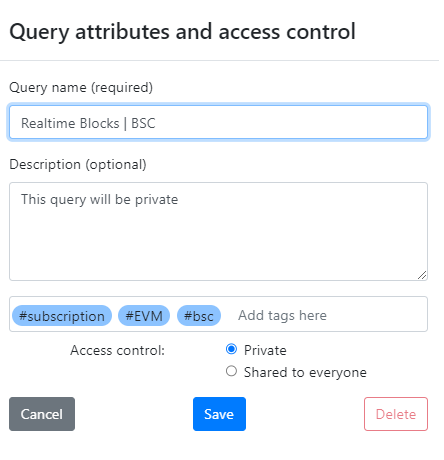
When to save privately
- Queries with client wallets, deal-specific token lists or internal addresses in the filters.
- Drafts you are still shaping; publish once the example is worth finding.
- Anything wired into an internal dashboard or alert whose logic you would rather not expose.
Leave the box unchecked for examples you want colleagues or the community to find; public queries are how most of the examples in these docs are shared.
Using a private query from code
The IDE is a place to write and test; your application sends the query text itself. Copy the query from the IDE into your code, or export it from the IDE's code panel for your language, and call https://streaming.bitquery.io/graphql (or /eap for Solana) with your access token. Nothing about a private save changes the request; the token, not the save state, decides what your code can read. See how to generate a token and how to use it.
Changing your mind
Open the query, change the checkbox and save again. Making a public query private removes it from search and from other accounts; making a private one public exposes the current text, so check it for addresses first. Deleting a query removes it for everyone who had the link.
Frequently Asked Questions
Who can see a private query in the Bitquery IDE?
Only the account that saved it. Other accounts and signed-out visitors cannot open it, and it does not appear in IDE search.
Does a private query still run from my application?
Yes. Your code sends the query text with your access token; the private setting only controls who can open the saved copy in the IDE.
Are public saved queries indexed by search engines?
Public saved queries have shareable URLs and appear in IDE search. Treat anything in a public query as visible; use Private for addresses or logic you do not want found.
Can I share a private query with one colleague?
Not selectively. Either save it publicly and send the link, or send the query text directly; team-level sharing is not part of the IDE save dialog.
Next steps
Ready to run this in production?
Get an API key and run these queries in minutes, or talk to us about plans and enterprise delivery.