Edge Details
An edge is the band between two nodes. Click it to open Edge details in the right-hand panel.
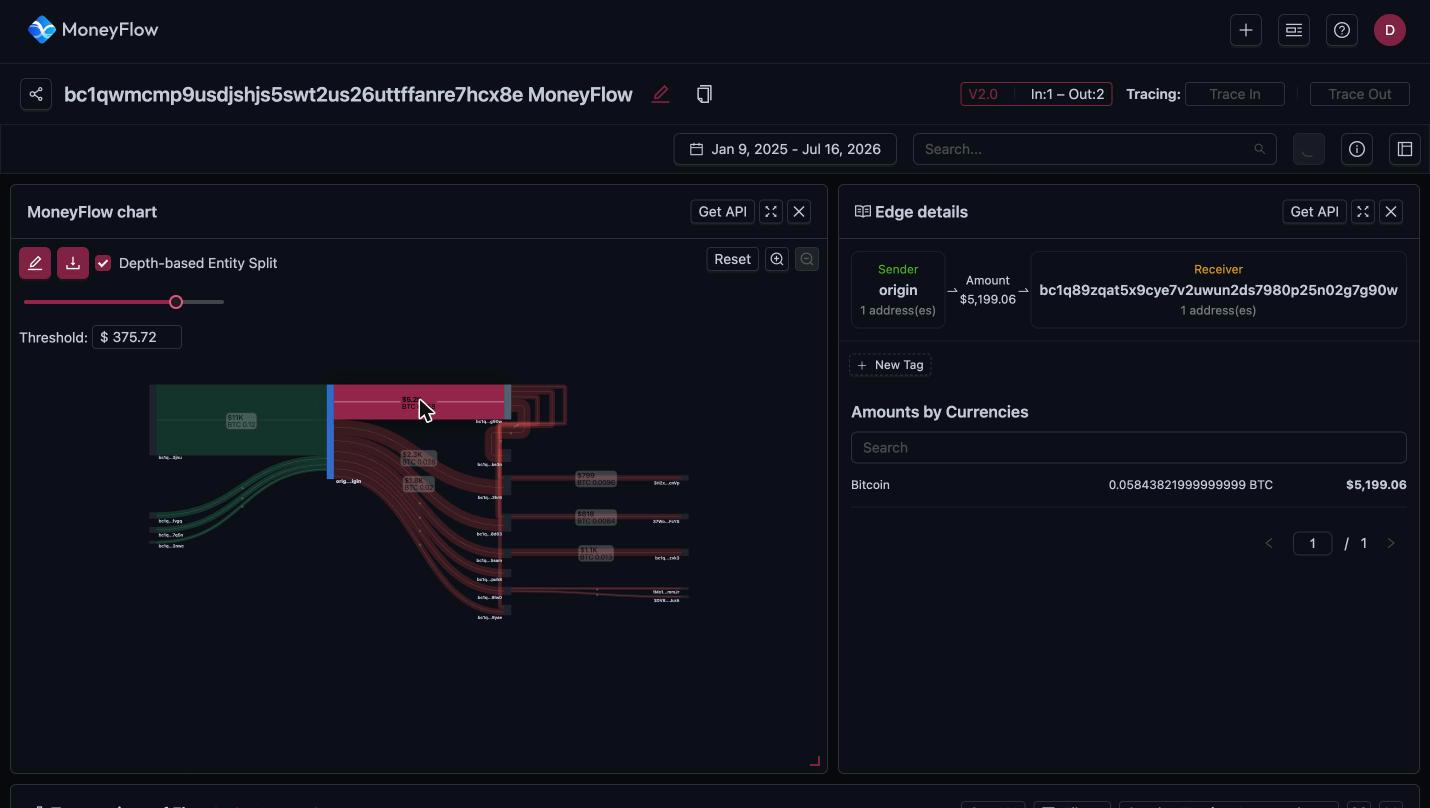
Sender, amount, receiver
The header of the panel reads left to right:
- Sender: the node the funds left, and how many addresses it groups.
- Amount: the total USD value of the edge.
- Receiver: the node the funds reached, and how many addresses it groups.
New Tag adds a custom tag to the edge.
Amounts by Currencies
The table lists each currency carried by the edge with the amount and the USD value. On a Bitcoin trace there is one row, Bitcoin. On an account-based chain an edge can carry several assets. Use the Search box to find one currency.
Transactions of Flow
When an edge is selected, the table at the bottom of the page becomes Transactions of Flow. It lists every on-chain transaction that makes up the edge: time, depth, hash, sender, receiver, transaction amount, tracing amount, currency and status.
Click a transaction hash to open it in the Bitquery Explorer. See transactions table for the full column reference.
Get API
Get API in the panel header opens the Coinpath® query behind this edge in the Bitquery IDE. See Get API.
Ready to run this in production?
Get an API key and run these queries in minutes, or talk to us about plans and enterprise delivery.